The Complete Guide to HR Software Implementation
A clean HRMS rollout across multi-location, multi-country operations requires seven structured phases, a tested rollback plan, and executive sponsorship that goes well beyond signing the budget.


Table of contents
One unstitched HR platform to manage your entire workforce, from hire to rehire.
Talent Management solutions built for growing and exceptional people
Built-in compliance tools that update with changing regulations
Automated payroll, attendance, and leave management
Insights that help HR leaders make faster, better decisions

Key Takeaways
- HR software implementation is a multi-phase process spanning requirements analysis, vendor selection, data migration, configuration, testing, training, and post-go-live optimisation, typically 3–12 months depending on organisational size.
- Enterprise leaders (CHRO, CFO, CIO) in regulated industries such as BFSI, Pharma, Healthcare, and Manufacturing benefit most from a structured, phased rollout safeguarding compliance and minimising operational disruption.
- Data readiness is the single biggest risk factor: poor data quality causes the majority of implementation delays, making early audit and cleanup essential.
- Change management and training are non-negotiable, and without executive sponsorship and role-specific adoption programmes, even the best HRMS will underperform.
- ZingHR's unified HCM platform, powered by Ghrowth.ai, its agentic intelligence engine, provides board-level reporting, compliance-first design, and phased implementation support engineered for multi-location enterprises across the globe.
- In 2026, 91% of HR leaders expressed interest in a unified HCM platform, making consolidation from fragmented point solutions the dominant implementation pattern.
A clean HRMS rollout can still go sideways if the groundwork is weak. Payroll teams find duplicate employee records, managers struggle with approval flows, and employees return to email because self-service feels confusing.
For enterprise HR, Finance, and IT leaders, HRMS implementation is less about switching tools and more about protecting payroll accuracy, compliance, workforce data, and user trust during change. Success starts before vendor demos, with clear requirements, data cleanup, workflow mapping, system testing, and training tied to real roles.
The guide walks through seven phases of HR software implementation in 2026, from objectives and vendor selection to migration, configuration, go-live, and post-launch measurement across multi-location enterprises.
7 Steps to a Successful HR Software Implementation
A structured approach prevents the budget overruns, data loss, and adoption failures plaguing unplanned rollouts. The table below maps each implementation phase to its core activities, typical timeline, and the stakeholders who must be involved.
Seven-phase HR software implementation roadmap showing core activities, typical timelines, and key stakeholders per phase.
How Did We Compile This Guide?
The implementation framework draws on industry research from the 2025–2026 HR Systems Survey (9,886 HR professionals across 4,670 organisations), best-practice guidance from HRMS implementation consultancies, and real-world deployment patterns observed across enterprise HCM rollouts in regulated sectors.
Our goal is to provide a balanced, vendor-informed but methodology-driven guide that operations and IT leaders can apply regardless of platform choice.
Phase-by-Phase HR Software Implementation Guide
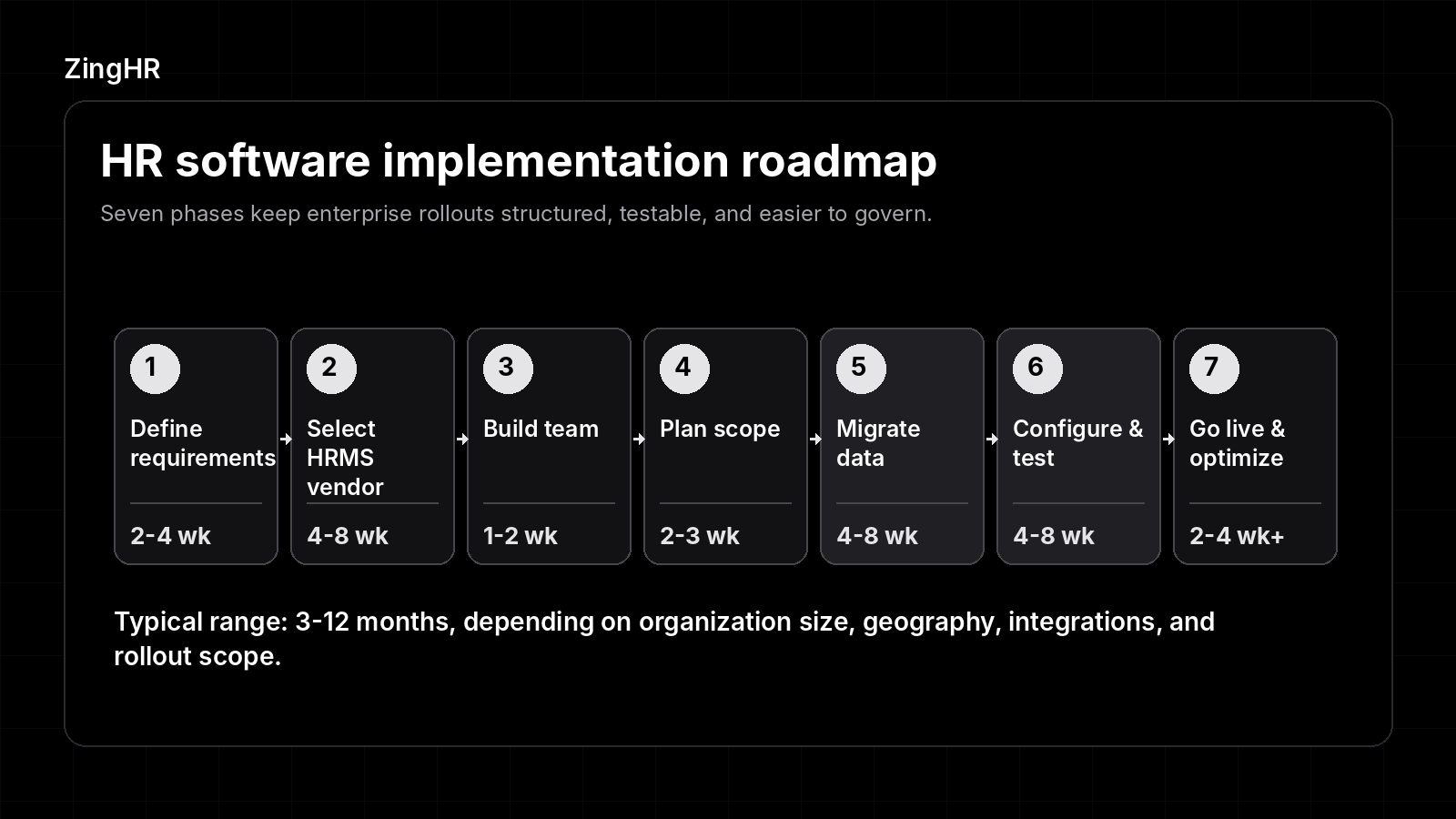
Each phase below covers the objectives, core activities, and practical recommendations for enterprise HR and IT leaders managing complex rollouts across regulated sectors.
1. Define Strategic Objectives and Requirements
Best for: CHROs, CFOs, and CIOs aligning HR technology investment with board-level business outcomes.
Every successful HR software implementation begins well before any vendor conversation. The requirements-definition phase forces your organisation to articulate what the new system must accomplish in measurable objectives tied to business priorities.
Vague directives like "modernise HR" are insufficient. For enterprises in BFSI, Pharma, or Manufacturing, objectives often include statutory compliance across multiple jurisdictions, unified workforce analytics for board reporting, and integration with existing ERP and payroll ecosystems.
Start by auditing your current workflows. Map every manual process, including onboarding checklists, leave approval chains, payroll reconciliation, and attendance capture, and identify where bottlenecks, errors, or compliance risks exist. Organisations skipping this step frequently select software replicating their existing problems in a digital wrapper.
In practice, teams investing two to four weeks in structured requirements gathering avoid an estimated 60% of the misalignment issues surfacing later during configuration.
Build a prioritised feature checklist. Separate requirements into "must-have" (e.g., statutory payroll for your operating countries, role-based access controls, audit trails) and "nice-to-have" (e.g., AI-driven workforce planning, sentiment analytics). Weight each criterion and use the resulting scorecard during vendor evaluation. The document becomes your implementation's north star. Every subsequent decision should trace back to it.
Key Activities in This Phase
- Stakeholder Interviews: Conduct structured sessions with department heads, line managers, and frontline HR staff. Enterprise implementations fail when the project reflects only the CHRO's vision without input from the people using the system daily. Each interview should capture current pain points, desired outcomes, and compliance requirements specific to the business unit.
- Compliance and Regulatory Mapping: For organisations operating in regulated industries, including Healthcare, BFSI, and Microfinance, document every statutory and regulatory obligation the HRMS must support. Coverage includes country-specific tax calculations, data residency requirements under GDPR or India's DPDP Act, and audit-trail standards. Mapping these requirements early prevents expensive rework during configuration.
- Current-State Technology Inventory: Catalogue all existing HR-adjacent systems: payroll processors, time-and-attendance devices, learning management platforms, recruitment ATS, and benefits portals. Understanding the integration landscape informs vendor selection and data migration planning. Organisations with more than five point solutions should strongly consider a unified HCM platform. Per Paycom/PSB Insights (2025), 91% of HR leaders expressed interest in exactly this approach.
- Success Metrics Definition: Define quantifiable KPIs before implementation begins: payroll accuracy rate targets (e.g., 99.5%), admin hours saved per week, employee self-service adoption rates, and time-to-hire reductions. These benchmarks become the yardstick for measuring post-go-live ROI.
2. Evaluate and Select Your HRMS Vendor
Best for: Procurement and IT leaders responsible for building the vendor shortlist and negotiating contracts.
Selecting the right HRMS provider is a strategic investment. While the process can be complex, a structured approach ensures your organisation achieves first-time implementation success.
Modern platforms powered by Ghrowth.ai, ZingHR's agentic intelligence engine, deliver real-time, actionable insights from a single strategic command centre. For enterprises managing multi-location operations across BFSI, Retail, QSR, or IT/ITes verticals, this is the critical differentiator legacy HRMS providers are unable to match.
Begin by issuing a formal RFP mirroring your prioritised requirements checklist. Include scenario-based questions: "Demonstrate how your platform handles statutory payroll for employees in India, UAE, and the UK simultaneously."
Require vendors to present live demos, not slide decks, using data scenarios relevant to your industry. In practice, organisations testing real workflows during demos achieve an 80% feature-match rate, significantly reducing post-purchase disappointment.
Score each vendor against weighted criteria: functional fit, implementation methodology, total cost of ownership (including hidden costs like data migration fees, per-user charges, and API call limits), vendor stability, and support SLA. Consider the vendor's track record in your specific vertical.
A platform proven in Manufacturing compliance may not suit a Healthcare organisation's credentialing requirements. Request reference calls with at least two clients of comparable size and industry.
Key Activities in This Phase
- Structured Demo Evaluation: Assemble a cross-functional evaluation panel, including HR, IT, Finance, and at least one end-user representative. Use a standardised scorecard during each demo. Score on usability, configurability, mobile experience, and compliance module depth.
- Total Cost of Ownership Analysis: Enterprise HRMS pricing varies significantly. Factor in licensing model (per-employee-per-month vs. flat tier), implementation services, data migration support, training costs, ongoing support tiers, and upgrade fees. Build a 3-year TCO model including a 15–20% contingency for scope adjustments.
- Security and Compliance Certification Review: Verify the vendor's security posture: SOC 2 Type II, ISO 27001, GDPR readiness, and data residency options. For enterprises in Healthcare or BFSI, request penetration test reports and business continuity documentation. Non-negotiable for organisations handling sensitive employee data across jurisdictions.
- Contract and SLA Negotiation: Negotiate clear SLAs for system uptime (99.9%+), support response times, and data portability. Confirm the contract includes an exit clause with data export provisions. Lock-in risk is real with monolithic platforms. A well-negotiated contract protects your organisation if the vendor underdelivers during implementation.
3. Assemble the Implementation Team
Best for: HR and project management leaders building the cross-functional team driving the rollout.
A successful HR software implementation requires coordinated effort from HR, IT, Finance, Legal, and operational departments. The implementation team's composition directly determines whether the project stays on track or drifts into scope creep, miscommunication, and missed deadlines.
Appoint a dedicated project sponsor at the C-level, typically the CHRO or CIO, with the authority to resolve cross-departmental conflicts and secure resources. Below the sponsor, designate a project manager (internal or vendor-provided) who owns the day-to-day execution plan.
Include functional leads from each department using or integrating with the HRMS: payroll, recruitment, L&D, IT infrastructure, and compliance. For enterprises with multi-location operations, add regional representatives who understand local regulatory and cultural nuances.
Establish a RACI matrix (Responsible, Accountable, Consulted, Informed) for every implementation workstream. Without clear role definitions, tasks fall through gaps, especially during data migration and UAT phases. Organisations formalising governance structures at the outset report significantly smoother rollouts and fewer escalations.
Also consider including teams outside the HR department, such as IT security and facilities management, who maintain other key infrastructure considerations.
Key Activities in This Phase
- Executive Sponsorship Activation: The project sponsor must do more than sign off on the budget. They need to communicate the strategic rationale for the implementation to the wider organisation, attend milestone reviews, and visibly champion the change. Without active executive sponsorship, middle-management resistance can stall adoption.
- Vendor Collaboration Model: Define how your internal team will work with the vendor's implementation consultants. Agree on communication cadence (weekly standups, bi-weekly steering committee), escalation paths, and shared project management tooling. Misalignment between internal and vendor teams is a common source of delays.
- Change Management Lead Appointment: Assign a dedicated change management lead, or engage an external specialist, to own communication planning, stakeholder engagement, and resistance mitigation. The role is distinct from the project manager and focuses exclusively on the people side of the transition. Organisations undergoing digital HR transformation find a dedicated change lead reduces adoption resistance by a significant margin.
4. Plan Budget, Timeline, and Scope
Best for: CFOs, project managers, and implementation leads who need to set realistic expectations and prevent scope creep.
Setting proper expectations around budget and timeline is one of the most critical and most frequently underestimated aspects of HR software implementation. Enterprise HRMS deployments are complex: they touch payroll, benefits, compliance, talent management, and often span multiple countries and business entities.
Without a detailed plan accounting for this complexity, projects routinely exceed budget by 20–40% and timeline by two to four months.
Begin with a written project charter defining scope, objectives, deliverables, milestones, and exclusions. The scope statement must be specific: "Phase 1 includes core HR, payroll for India and UAE, and attendance integration. Performance management and learning modules are Phase 2." Ambiguity in scope is the primary driver of creep. Attach the charter to the vendor contract so both parties share a single source of truth.
Build your budget across four categories: software licensing, implementation services (vendor and internal labour), data migration and integration, and training. Add a 15–20% contingency buffer for unforeseen requirements, including regulatory changes, additional data cleansing, or integration complications surfacing during configuration.
For the timeline, work backwards from your target go-live date. Account for dependencies: data migration cannot start until the data audit is complete, and UAT does not begin until configuration is locked. Build buffer weeks at each major milestone rather than only at the end.
Key Activities in This Phase
- Milestone-Based Project Plan: Break the implementation into weekly or bi-weekly milestones with clear deliverables, owners, and acceptance criteria. Use a Gantt chart or project management tool accessible to the entire team. Every milestone should have a go/no-go decision point, preventing the project from advancing with unresolved issues.
- Risk Register Development: Identify potential risks at the planning stage: key-person dependency (what if the HRIS analyst leaves mid-project?), data quality issues discovered late, vendor resource availability during peak seasons, and regulatory changes. Assign each risk a probability and impact score, designate an owner, and document mitigation actions. Revisit the risk register at every steering committee meeting.
- Phased vs. Big-Bang Rollout Decision: Enterprise organisations overwhelmingly benefit from phased rollouts, deploying by module (Core HR first, then Payroll or so on) or by region (headquarters first, then satellite offices). Phased approaches limit the information employees must absorb at any one time, allow the team to incorporate lessons learned between phases, and contain the blast radius if issues arise. Big-bang rollouts, going live with everything simultaneously, carry a higher risk and are typically only advisable for small organisations with simple configurations.
- Communication Plan: Draft a stakeholder communication plan specifying what information goes to whom, when, and through which channel. Executives need quarterly dashboards on budget and milestone status. Managers need monthly previews of what is changing for their teams. End users need clear, jargon-free notifications about training schedules and go-live dates. Transparent communication builds the trust sustaining adoption.
5. Execute Data Migration
Best for: HRIS analysts, IT teams, and data stewards responsible for moving employee records into the new system without loss or corruption.
Data migration is the single highest-risk phase of any HR software implementation. Poor data quality causes the majority of implementation delays, and the consequences of migration errors, including incorrect payroll calculations, missing compliance records, and orphaned employee files, can be severe, especially in regulated industries. Organisations treating data migration as a technical afterthought pay for it in rework, go-live delays, and eroded user trust.
Start the data audit at least three months before your planned migration date. Inventory every data source: your current HRIS, spreadsheets maintained by regional teams, payroll files, benefits enrollment records, and employee documents stored in shared drives or digital locker systems. For each source, assess data completeness, accuracy, format consistency, and duplication.
Enterprise organisations with multi-location operations commonly discover regional offices maintaining parallel datasets with conflicting employee information. Reconcile these before migration. Addressing conflicts post-migration compounds delays significantly.
Define your migration strategy: full historical migration (all records from day one) or cutover migration (only active records plus a defined lookback period). Full history is often necessary for compliance and audit trail purposes in BFSI and Healthcare, but it adds significant complexity.
Regardless of the approach, execute the migration in test cycles. Import a 10% sample first, validate thoroughly, correct mapping errors, then scale to full import. Never migrate directly into the production environment without at least two successful test runs.
Key Activities in This Phase
- Data Cleansing and Standardisation: Standardise data formats across all sources before migration: date formats (DD/MM/YYYY vs. MM/DD/YYYY), name conventions, job title taxonomies, cost centre codes, and address structures. Remove duplicate records, fill data gaps where possible, and flag records requiring manual review. The process is labour-intensive but prevents cascading errors in the new system.
- Field Mapping and Transformation Rules: Create a detailed field-mapping document specifying how each data element in the legacy system maps to the target system. Where the new HRMS uses different field names, data types, or validation rules, define transformation logic. For example, if the legacy system stores employee status as "A/I/T" but the new system requires "Active/Inactive/Terminated," document the mapping explicitly.
- Migration Testing and Validation: After each test import, run validation checks: record counts (do the numbers match?), data integrity (are salary figures correct to the decimal?), relational integrity (are employees linked to the right departments and managers?), and compliance checks (are all mandatory fields populated for statutory reporting?). Involve functional users alongside IT in validation. Payroll managers should verify payroll data; HR business partners should verify employee records.
- Rollback Planning: Define a clear rollback plan in case the migration fails or produces unacceptable results. The plan should include maintaining the legacy system in read-only mode during cutover, retaining backup copies of all migrated data, and documenting the steps to revert. No enterprise should go live without a tested rollback procedure.
6. Configure, Test, and Integrate
Best for: IT leads, functional consultants, and vendor teams responsible for system setup and quality assurance.
Configuration transforms a generic HRMS into a system reflecting your organisation's specific policies, workflows, approval hierarchies, and compliance requirements. The phase bridges the gap between the vendor's out-of-the-box capabilities and your enterprise's operational reality. In regulated sectors like Pharma or Microfinance, configuration also includes setting up audit trails, approval workflows for sensitive actions, and compliance reporting templates.
Begin by configuring the organisational structure: legal entities, business units, departments, cost centres, locations, and reporting hierarchies. Then configure HR policies: leave types and accrual rules, attendance policies, payroll components (earnings, deductions, statutory contributions by country), and benefits eligibility rules. For enterprises operating across multiple geographies, each country's statutory requirements must be configured separately. Indian PF/ESI calculations differ fundamentally from UAE gratuity rules or UK PAYE.
Integration is equally critical. The HRMS rarely operates in isolation, requiring data exchange with payroll processors, ERP systems, time-and-attendance hardware, learning platforms, and recruitment tools. Define integration architecture early: real-time API calls, scheduled batch imports, or middleware. Test each integration point independently before end-to-end testing. A broken payroll integration discovered during go-live is a crisis. Discovered during testing, it becomes a manageable fix.
Key Activities in This Phase
- User Acceptance Testing (UAT): UAT is your last line of defence before go-live. Recruit end users alongside IT staff to execute real-world scenarios: processing a new hire, running payroll for a specific country, approving a leave request and generating a compliance report. Document every defect, classify by severity, and resolve all critical and high-severity issues before proceeding. Organisations rushing or skipping UAT consistently experience higher post-go-live defect rates.
- Security Configuration and Access Controls: Configure role-based access controls (RBAC), enforcing the principle of least privilege. An HR executive should not have the same system access as a payroll administrator. Define roles, assign permissions, and test access boundaries. For organisations subject to SOC 2 or ISO 27001, document the access control matrix as part of your audit evidence. Verify cloud-based HR software configurations meet your data residency and encryption requirements.
- Integration Testing: Test every integration point under realistic conditions: correct data volumes, concurrent user loads, and edge cases (e.g., what happens when the payroll API returns an error?). Validate data accuracy end-to-end: an attendance record captured at a biometric terminal should flow correctly through the HRMS into the payroll calculation without manual intervention.
- Performance and Load Testing: For enterprises with thousands of employees, verify system performance under production-scale load. Simulate month-end payroll processing, peak-time attendance capture, and concurrent self-service access. Identify and resolve performance bottlenecks before go-live. Slow system response during payroll processing is unacceptable in any industry.
7. Go Live, Train, and Optimise
Best for: All stakeholders, from C-suite sponsors to frontline employees, transitioning to the new system.
Go-live is where value realisation begins. The transition from the old system to the new one must be managed with the same rigour as the preceding phases. A poorly executed go-live, marked by confusing communications, untrained users, and unresolved defects, can undermine months of careful planning and permanently damage user confidence.
Execute the go-live in a controlled, phased manner. If you chose a phased rollout strategy, begin with the module or region with the most thorough testing and the strongest internal champions. Maintain the legacy system in read-only mode for a defined parallel-run period (typically two to four weeks) so payroll and compliance teams can cross-verify results. Designate "floor walkers," trained super-users stationed in each department or location, who can provide immediate, in-person support during the first weeks.
Training must be role-specific and practical. Generic webinars do not suffice. Payroll administrators need hands-on training for payroll processing and statutory reporting. Managers need training on approval workflows and team dashboards.
Employees need training on self-service features: leave requests, pay slip access and tax declaration submissions. Deliver training as close to go-live as possible (within one to two weeks) to maximise retention, and provide on-demand reference materials, including short videos and quick-reference guides, for ongoing support.
Key Activities in This Phase
- Hypercare Support Period: Establish a dedicated hypercare period (typically two to four weeks post-go-live) during which the vendor and internal teams provide elevated support. Staff a helpdesk with extended hours, prioritise defect resolution with accelerated SLAs, and hold daily triage meetings to address issues. The hypercare period builds user confidence and prevents small issues from escalating into adoption blockers.
- Post-Go-Live KPI Tracking: Activate the success metrics defined in Phase 1. Track payroll accuracy, self-service adoption rates, support ticket volumes, and processing time reductions weekly during the first quarter. Compare against pre-implementation baselines. Per Paycom/PSB Insights (2025), 84% of HR leaders predict positive impacts on business goals from unified HCM platforms, and realising those impacts requires disciplined measurement.
- Continuous Improvement Cycle: Schedule a formal post-implementation review at 30, 60, and 90 days. Gather feedback from all user groups, identify process gaps, and prioritise enhancements for subsequent releases. The initial go-live configuration is rarely the final state. Organisations committing to quarterly optimisation cycles extract significantly more value from their HRMS investment over time.
- Phase 2 Planning: If your implementation was phased by module or geography, use the lessons learned from Phase 1 to accelerate subsequent rollouts. Document what worked, what caused delays, and what you would change. Apply these insights to the next phase to reduce the timeline and improve adoption. Enterprises treating implementation as an ongoing programme, rather than a one-time project, consistently outperform those declaring "done" at go-live.
Benefits of HR Software Implementation
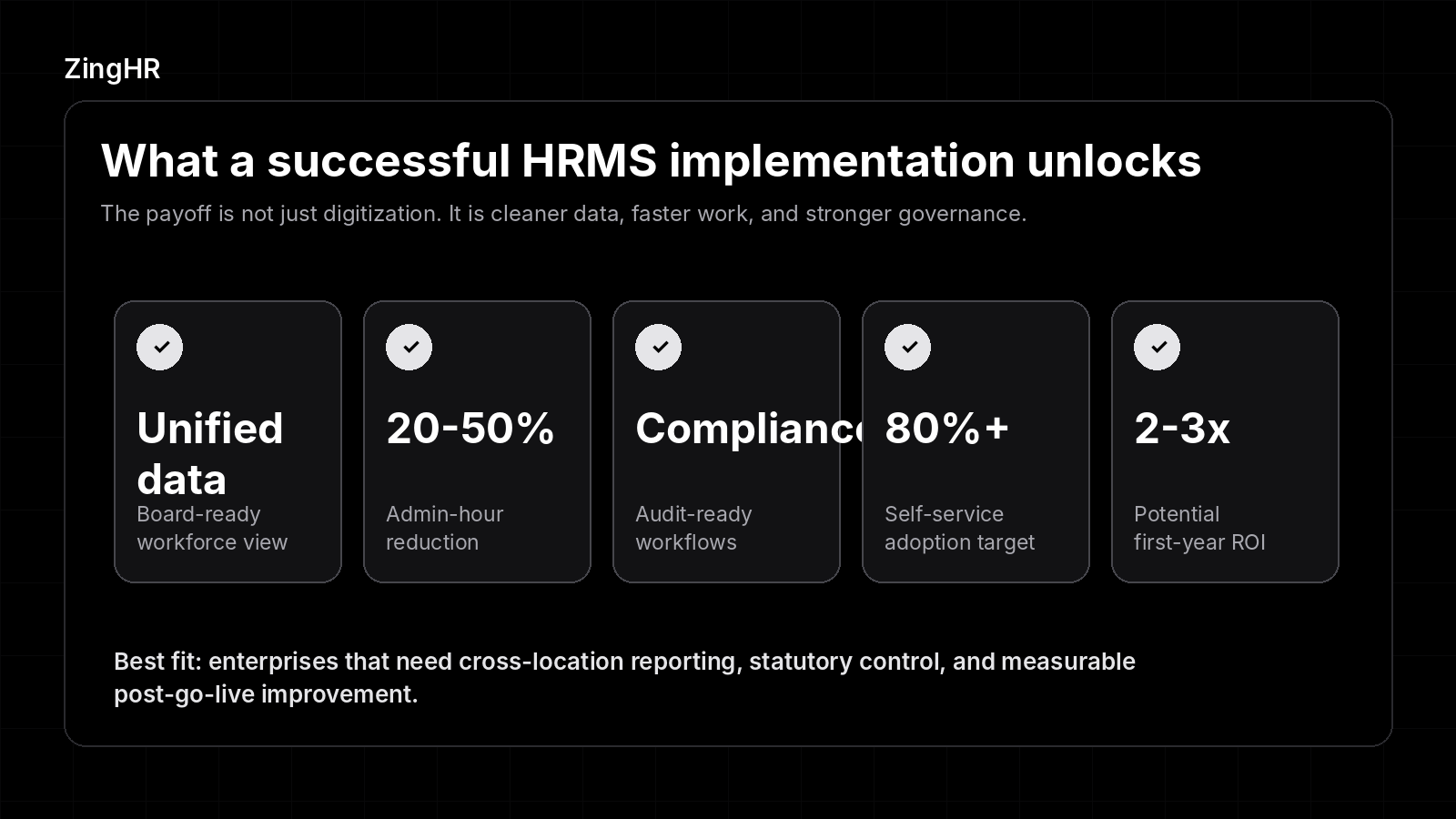
A structured HR software implementation delivers returns across compliance, efficiency, and workforce strategy. The gains below represent the most consistent outcomes enterprises report in the first year post-go-live.
1. Unified Workforce Data for Board-Level Decision Making
One of the most immediate benefits of a well-implemented HRMS is the elimination of data silos. When employee data from payroll, attendance, performance, recruitment, and benefits resides in a single platform, leadership teams gain a unified view of workforce metrics.
CHROs can present headcount trends, attrition risk, and labour cost projections to the board with confidence, rather than manually reconciling conflicting spreadsheets from regional offices. With 84% of leaders operating across three to 10 talent platforms and just 5% having fully connected systems, consolidation delivers an immediate strategic advantage.
2. Operational Efficiency and Admin Time Reduction
HR software implementation automates repetitive, error-prone tasks: leave approvals, payroll calculations, statutory filing, onboarding document collection, and attendance reconciliation.
Organisations typically report a 20–50% reduction in administrative hours within the first quarter post-implementation. For enterprises with thousands of employees across multiple locations, this translates directly into reduced HR headcount requirements or, more strategically, redeployment of HR staff from transactional work to employee engagement, talent development, and workforce planning.
3. Compliance Assurance Across Jurisdictions
Regulated industries, including BFSI, Healthcare, Pharma, and Microfinance, face mounting compliance complexity. Labour laws, tax regulations, data privacy mandates, and industry-specific reporting requirements vary by country, state, and even municipality.
A properly configured HRMS automates compliance calculations, generates audit-ready reports, and enforces policy-based workflows, preventing non-compliant actions. Automation reduces the risk of penalties, audit findings, and reputational damage. For organisations navigating HR challenges across borders, compliance automation is a primary implementation driver.
4. Improved Employee Experience and Self-Service Adoption
Modern HRMS platforms give employees direct access to self-service capabilities: submitting leave requests, accessing pay slips, updating personal information, declaring tax investments, and enrolling in benefits, all from a mobile device. Self-service reduces dependency on HR for routine inquiries, shortens resolution times, and improves employee satisfaction.
Enterprises achieving 80%+ self-service adoption within six months of go-live typically see a measurable reduction in HR service desk ticket volumes.
5. Measurable ROI and Strategic Workforce Planning
HR software implementation generates ROI through cost avoidance (fewer payroll errors, reduced compliance penalties, lower manual processing costs) and value creation (faster hiring, better retention through analytics-driven engagement, and data-informed workforce planning).
Organisations tracking KPIs from day one of go-live and optimising quarterly can demonstrate 2–3x ROI within the first year, a compelling narrative for CFOs evaluating the investment.
Key Features to Evaluate in Modern HR Software
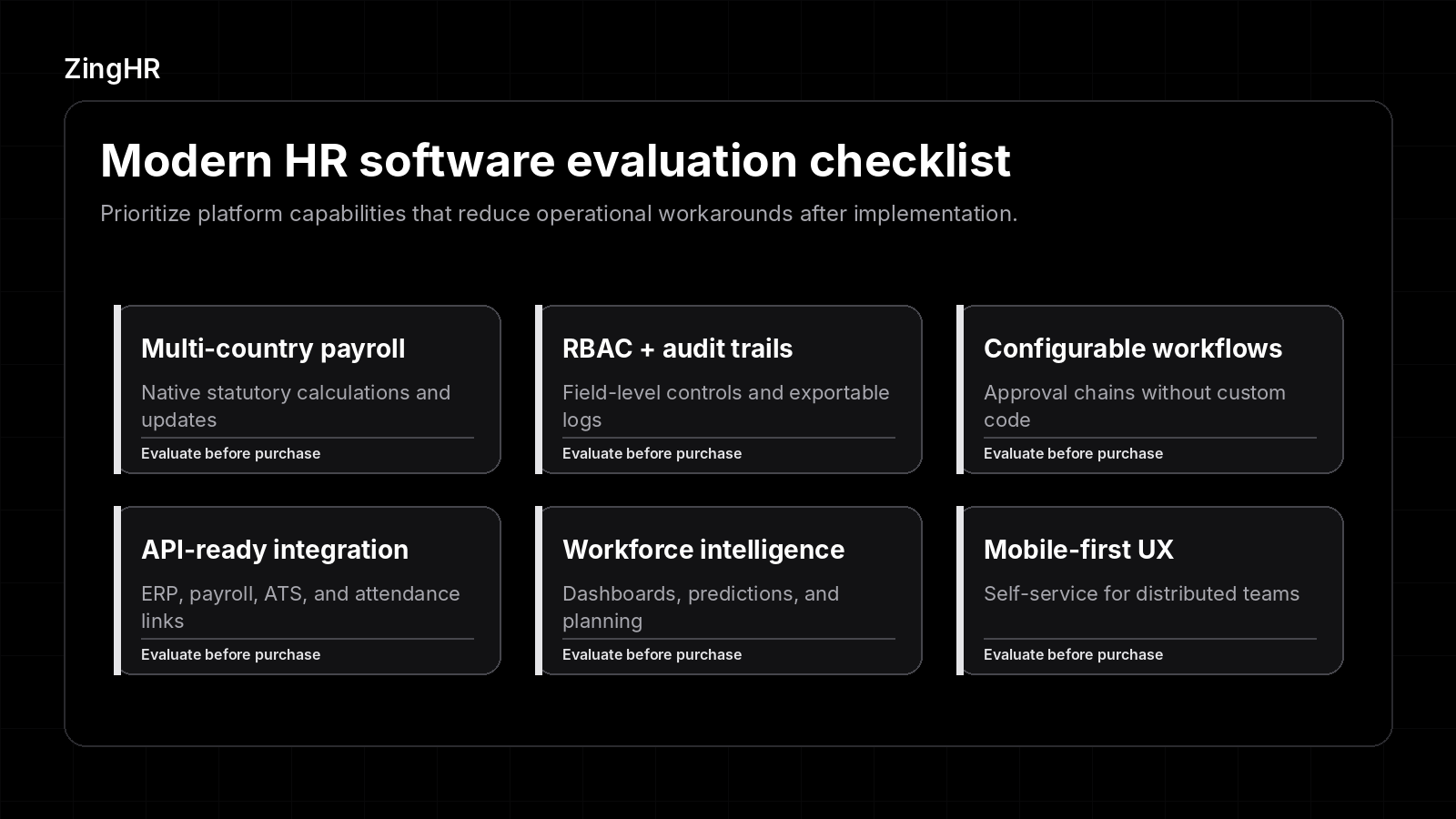
Not every HRMS delivers the same depth of capability. The features below represent the minimum viable set for enterprise-grade implementations in regulated sectors. Evaluate each against your organisation's specific operating countries, workforce complexity, and compliance obligations.
1. Multi-Country Statutory Payroll
For enterprises operating across multiple geographies, the payroll engine must natively handle country-specific tax calculations, social security contributions, and statutory filings, rather than relying on workarounds or third-party add-ons.
Evaluate whether the platform supports your current and planned operating countries, and whether statutory updates are delivered automatically when regulations change.
2. Role-Based Access Controls and Audit Trails
In regulated industries, granular access controls and comprehensive audit trails are compliance requirements. Treating them as optional features introduces audit risk.
The system should enforce role-based permissions at the field level, log every data change with timestamps and user identifiers, and support audit exports in formats acceptable to regulators. SOC 2, ISO 27001, and GDPR alignment should be verifiable.
3. Configurable Workflows and Approval Chains
Every enterprise has unique approval hierarchies, escalation paths, and exception-handling rules. The HRMS should allow HR administrators to configure workflows without writing code, adding approval levels, conditional routing based on employee attributes (location, grade, department), and automated notifications. Rigid, hard-coded workflows force organisations to adapt their processes to the software, rather than the reverse.
4. Integration Architecture (APIs and Middleware Support)
No HRMS operates in isolation. Evaluate the platform's API library, webhook support, and compatibility with integration middleware (e.g., MuleSoft, Dell Boomi). Verify pre-built connectors exist for your ERP, payroll processor, time-and-attendance devices, and recruitment platforms.
The cost and complexity of custom integrations can significantly impact the total cost of ownership. Assess these during vendor evaluation, before purchase decisions are finalised.
5. Analytics and Workforce Intelligence Dashboards
The shift from descriptive reporting ("what happened") to predictive and prescriptive analytics ("what will happen and what should we do") is accelerating. In 2025, 73% of HR directors had adopted AI, compared with 66% of managers and supervisors and 65% of individual contributors.
Evaluate whether the platform provides configurable dashboards, predictive attrition models, workforce planning simulations, and real-time headcount analytics accessible to both HR leaders and the C-suite.
6. Mobile-First Employee Experience
With distributed workforces, field employees, and multi-shift operations, mobile access is essential. Evaluate the mobile experience for employee self-service (leave, attendance, pay slips), manager approvals, and HR administrative tasks. A cloud HRMS software platform with a native mobile app, rather than a responsive web wrapper, delivers superior performance and offline capabilities for frontline workers in Manufacturing, QSR, and Retail.
Why Choose ZingHR for Your HR Software Implementation?
Legacy HRMS providers typically require extensive customisation and fragmented add-ons. ZingHR delivers a unified HCM platform, powered by Ghrowth.ai, its agentic intelligence engine, engineered for enterprise complexity.
- The platform’s strategic command centre provides boards and CXOs with real-time workforce insights, compliance dashboards, and actionable analytics from a single interface, eliminating the data silos and manual reconciliation plaguing multi-vendor stacks.
- For CHROs and CIOs at organisations across BFSI, Manufacturing, Pharma, Retail, Healthcare, and IT/ITes, ZingHR's compliance-first architecture supports multi-country statutory payroll, configurable workflows, and regulatory reporting out of the box.
- ZingHR's implementation methodology is designed for phased enterprise rollouts, with dedicated project management, structured data migration support, and role-based training programmes accelerating adoption.
- The platform's proven deployment across 50+ countries ensures regional compliance requirements, from Indian PF/ESI to UAE WPS to GDPR, are addressed natively rather than retrofitted.
- Organisations implementing ZingHR typically benefit from measurable reductions in HR administrative overhead, payroll processing time, and compliance risk within the first quarter of go-live.
For enterprise leaders evaluating their next HCM investment, ZingHR offers a partner and platform engineered for measurable business outcomes and board-level governance.
Book a demo to see how Ghrowth.ai, ZingHR's agentic intelligence engine, transforms HR software implementation from a technology project into a strategic advantage.
Frequently asked questions (FAQs)
HR software implementation follows a structured seven-phase roadmap: define strategic objectives and requirements, evaluate and select your HRMS vendor, assemble the cross-functional implementation team, plan budget and timeline with scope controls, execute data migration with rigorous testing, configure the system and run user acceptance testing, and go live with role-based training and ongoing optimisation.
Implementation timelines vary significantly based on organisational size, geographic complexity, and scope. Small businesses deploying a single-country HRMS (e.g., core HR and payroll) can expect 3–4 months. Mid-market organisations with multi-module requirements typically require 4–6 months. Large enterprises with multi-country statutory payroll, complex integrations, and thousands of employees should plan for 6–12 months.
The three most frequent challenges are poor data quality (responsible for the majority of delays and rework), organisational resistance to change, and integration failures with existing systems. Mitigate data risk by starting the audit and cleanup process three months before migration. Address resistance through executive sponsorship, transparent communication, and role-specific training delivered close to go-live.
Score vendors using a weighted scorecard across five dimensions. Evaluate functional fit without heavy customisation, and look for structured implementation methodologies. Calculate the three-year total cost of ownership, including migration and support. Verify security certifications (SOC 2, ISO 27001, GDPR) and confirm proven vertical expertise at a comparable scale.
Start data audits at least three months before migration. Inventory all sources, then standardise, deduplicate, and reconcile records. Choose between a full historical or cutover migration. Run test migrations using a 10% data sample. Require two successful test cycles before the full import. Never migrate directly to production without validation. Keep legacy systems read-only during cutover and document a tested rollback procedure.
Establish pre-implementation baselines for payroll errors, admin hours, time-to-hire, compliance incidents, and self-service usage. Track progress weekly during Q1, then monthly. Target 99.5%+ payroll accuracy, a 20–50% reduction in admin hours, and 80%+ self-service adoption within six months. Calculate financial ROI as (annual automation savings + cost avoidance) / total investment. Optimising against these metrics quarterly typically delivers a 2–3x first-year ROI for executive stakeholders.
What to do next?
See ZingHR in Action
Join the 1,200+ enterprises that have replaced fragmented HR with one intelligent, future-ready platform. See ZingHR in 30 minutes.
Build the Organization You Want
Great HR drives retention, capability, and culture. ZingHR takes care of the operational layer so your people team owns the strategy.

Elevating Impact.
Defining Destiny
See how ZingHR's AI-powered Hire-to-Retire platform frees your CPO to lead with purpose and deliver the outcomes your Board is watching for


ZingHR is the AI-powered Hire-to-ReHire platform built for one purpose to remove every transactional layer of HR from your organisation, permanently.